OPDS access
OPDS is an open catalog format that most dedicated e-reader apps understand — Aldus exposes your library through it so you can browse and download books outside the Aldus app itself, on an e-ink device or any other OPDS-compatible reader.
Create a credential
Section titled “Create a credential”- Sign in to Aldus and open Account.
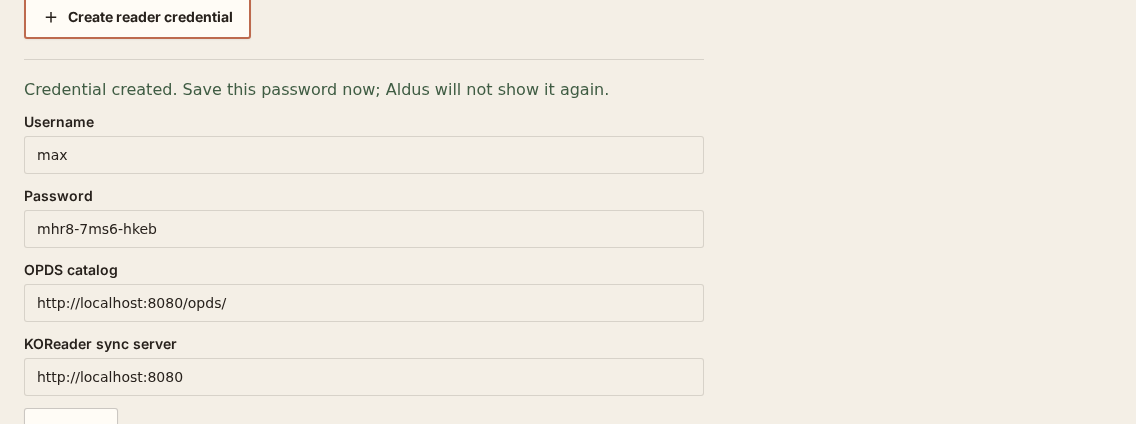
- Under KOReader and OPDS, name the credential after the device or app you’ll use it in, then select Create reader credential.
- Aldus shows a Username, a generated Password, and an OPDS catalog URL — something like
https://your-server/opds/. Save the password now; it isn’t shown again.
Add it to your reader
Section titled “Add it to your reader”In your OPDS-compatible app, add a new catalog using the OPDS catalog URL from Aldus. When it asks for credentials, use the Username and Password from the same credential — OPDS access is authenticated with standard HTTP credentials, the same username and password shown on the Account screen.
Aldus applies your normal library permissions to the catalog: you’ll only see the libraries and titles you already have access to in the app, nothing more.
KOReader can search the catalog, page through large libraries, display available cover art, and preserve the original EPUB filename when downloading. If a title is not visible, confirm that your Aldus account belongs to its library and that the title has an EPUB representation.
What OPDS gives you — and what it doesn’t
Section titled “What OPDS gives you — and what it doesn’t”OPDS provides catalog browsing and file download: you can see your library’s titles and pull the ebook files down to your reader. It does not carry Aldus’s exact ebook↔audiobook synchronization — that depends on the reader app itself. Plain OPDS clients simply download the file with no progress sync back to Aldus. KOReader is the exception: it has a dedicated sync adapter (see KOReader) that reports reading progress back to Aldus using the same credential.
Use the OPDS-downloaded EPUB unchanged when you want binary progress matching. Renaming or moving it is safe; converting, rebuilding, or editing it changes its document identity.
Revoke access
Section titled “Revoke access”Find the credential under Account → KOReader and OPDS and select Revoke. This immediately ends both OPDS and any progress-sync access for that credential.